
Two Hand Control Logic using PLC

 This article is about the programming of two-hand control used in the press industry.

The purpose of this program is about safety to prevent fatal accidents. Below is an image of how the press machine looks and why we care about safety. As you can see there are pushbuttons used to control the press machine. The center plate is pushed against the surface of the workpiece when we press the push buttons.

The two pushbuttons must be pressed at the same time to operate the press machine as shown in the below animation.
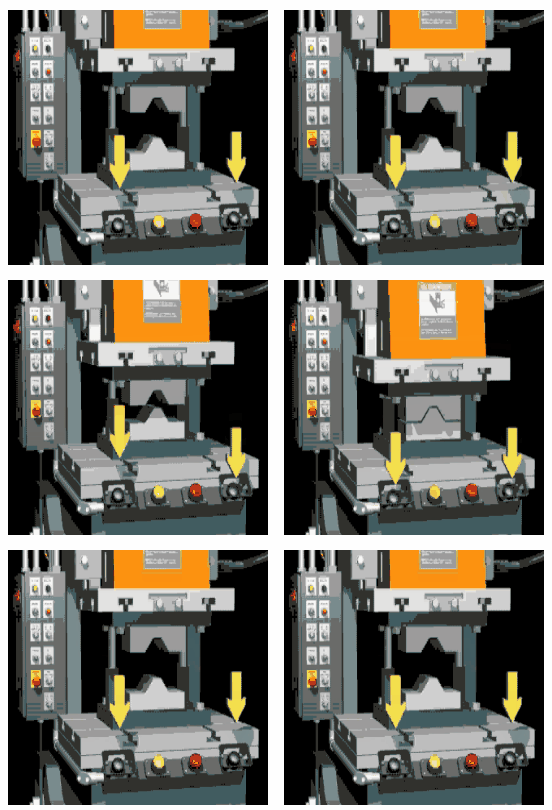
When the operator uses his one hand to press the button and use his second hand when plate pushing against the surface, he can injure himself. The powerful force of pushing a plate can easily squeeze hands if the operator tries to maneuver things in a hurry.

Below I have explained the program used to prevent such incidents with the help of Siemens TIA Portal.

Here in the below figure press machine which has two inputs and one output is shown. Inputs are connected to the plc digital input (DI) module and single output which is connected to the digital output (DO) module.

Below is a list of inputs and outputs used for the program.

Inputs:
  • Push Button  (PB_1): I0.0
  • Push Button  (PB_2): I0.2
Outputs:
  • Press Machine Output: Q0.0
Two-Hand Control Logic

Logic Description
Network 1:
Here two push-buttons PB_1 & PB_2 are connected in series. When both push-buttons are pressed at the same time, then the signal will pass through NC contact of timer T0 and energize the output.

Network 2:
Now if any single push button either PB_1 or PB_2 is pressed then timer T0 on-delay timer (S_ODT) is energized, here in our case after 5 seconds.

Here NC contact of press machine’s output is also used after push button because if the output is ON then it won’t allow the timer to energize.

So, the machine’s output will only energize when both buttons are pressed together.


Comments

Popular posts from this blog

Ferrules and Cross Ferruling

 Ferrules are identification labels provided for every wire terminations in an instrument, equipment, or electrical/instrumentation control panels. These tube-shaped sleeves can be inserted easily on each individual wire in a multi-core cable. In earlier days fixed digits/letters are used as ferrules, but now Instrumentation engineers/technicians prints out desired ferrules by using a ferrule printing machine. Typical Ferrule The numbers/ letters on the ferrules will be given as per the approved electrical hook up or loop diagrams. This helps technicians to easily identify a particular loop/wiring from a series of terminal blocks and to troubleshoot the desired terminal connection. Separate numbers on the ferrules distinguish the positive and negative polarities of wires, thus ensure the polarity protection of the instrument. Cross Ferruling  As a wire is connected on its both ends, it is quite useful to use a cross reference method for wire identification. Unlike normal ferru...

What is a Torbar? – Averaging Pitot Tubes

 The Torbar is employed for flow measurement of liquids, gases, or steam in circular, square, or rectangular section ducts for large flow rates. The Torbar is an insertion type multi-port self-averaging primary sensor for flow measurement. Torbar TORBAR is a set of Pitot tubes mounted on a bar across the pipeline with no moving parts. An averaging Pitot tube is a technology, while TORBAR is a manufacturing brand name. There are several brands available in the market with VERABAR, ANNUBAR, etc. Averaging Pitot Tube Principle Purpose Averaging Pitot tube can be employed when the average velocity of the flow profile, rather than the velocity in a specific point in the cross-section is desired. Averaging Pitot Tubes Principle It measures the differential pressure between the static pressure tap and the tap of full pressure of a stream. Thus such magnitude of differential pressure is directly proportional to the square of the flow rate. Working The TORBAR is designed in such a way that ...

The Method and Process of Siemens PLC Hardware Configuration

 The hardware configuration of Siemens PLC can usually adopt the following methods and processes: Determine control tasks and system requirements: Before hardware configuration, it is necessary to clarify the tasks and requirements of the control system, including the requirements for input and output points, control accuracy, speed, and safety. Select the PLC model and module: According to the control task and requirements, select the appropriate PLC model and module, including CPU, I/O module, communication module, power supply module, etc. Assemble the cabinet and install the modules: According to the selected PLC model and module, assemble the cabinet and install the modules, pay attention to the installation sequence, cable wiring, wiring method, etc. Connect the input and output devices: connect the input and output devices with the input and output modules of the PLC, you need to pay attention to the correctness, stability and safety of the wiring. Perform software configura...